Cloud Claude-ing
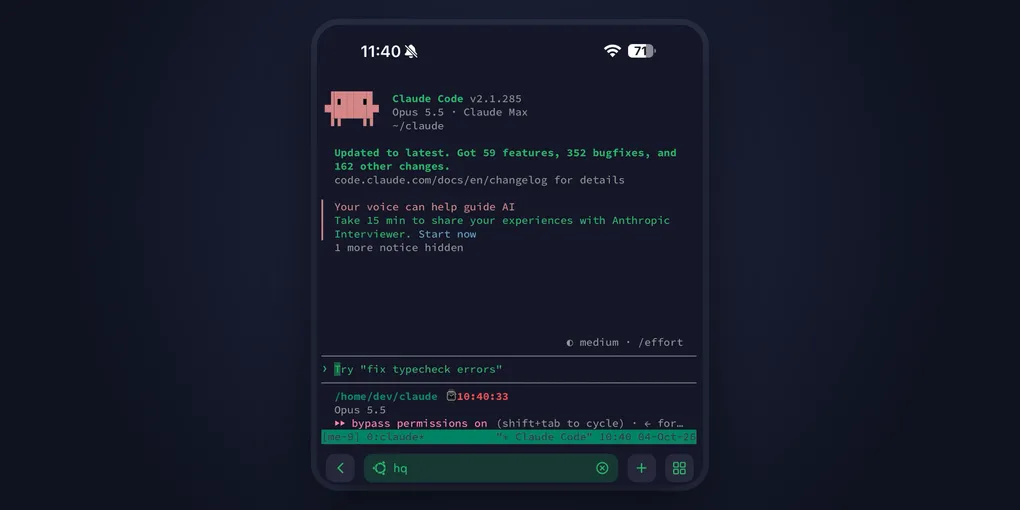
TLDR; I put Claude on a server. Now, I’m getting more done and can steer it from my phone, wherever I am.
Intro
I’d been using Claude Code (CC) for building projects for months and as I got more proficient at using it, I felt bottlenecked by my setup. There were three major issues - memory, security and flexibility.
Memory
My mac only has 8GB of RAM. 8GB of RAM on a mac goes a long way and I’ve used it just fine for years but I increasingly needed to spin up multiple Claude Code sessions in parallel. These sessions could be executing a task on a project or working on a different idea entirely. They could span hours, even days, during which I’d be compacting. Each session takes up memory and that increases as sessions go on for longer, at some point I was restarting my laptop frequently or delaying ideas because my laptop couldn’t keep up.
Security
Claude (AI agents generally) works very well (and faster) when they can drive the full loop from getting a goal to verifying the result. This meant, it was more efficient when it could run the code it built. It debugged better when I gave it access to the file system rather than copying commands between a chat window and my local terminal, etc.
This made it very tempting to give Claude access to everything. Repositories, my laptop, emails etc. Not doing it felt like I was leaving productivity on the table. But there are issues with this.
To begin with, if Claude makes a mistake, it could break repositories, expose private emails, brick my laptop and so on. Furthermore, giving Claude access sometimes involves sharing privileged access tokens. The tokens can get leaked in chat or exfiltrated by a compromised Claude or a malicious service.
Flexibility
A lot of work didn’t need me to be at my computer. For some work, I only needed to steer Claude, approve certain actions, or provide certain context which it couldn’t access and that was it. Sometimes I’d be out for hours and come back to see that Claude stopped working 30 mins after I left because it needed a 5 word input from me.
It seemed like if I could keep my computer powered on, supplied with fast internet, and, protected from unauthorized access, I didn’t have to slow down even when I was away from my computer.
Enter the Forgotten Server: HQ
A solution was to get a new bigger machine for Claude-driven work, control what privileged info I put on it and put it in a secure physical space. That wasn’t practical. I’d need to get a new computer, provide constant electricity and fast internet and keep it open for Claude to keep working but protect it from unauthorized physical access.
While contemplating this, I remembered I already had a setup that could get me halfway there. I rent servers in the Cloud that I use for hosting side projects and running experiments, one of those servers was a bare metal machine, HQ, with 64GB RAM (more than enough memory) and 4 cores. It was also in a datacenter so for the most part it was physically secure.
All I really needed was terminal. My internet was fast enough that keystrokes appeared as I typed in the remote terminal, I only looked at code when reviewing Claude PRs or reviewing plans with Claude. If I needed to, I could connect my local code editor with the remote instance via SSH and work as if it were a local machine.
There was also the issue of terminal sessions ending once my SSH connection dropped, but I easily solved that using tmux. tmux made it possible to create terminal sessions that lasted even after SSH connections dropped. I could also create multiple terminal sessions, one for each CC session.
Security, Again
Although HQ was a solution to my problem, I couldn’t dump Claude there with no restrictions and pray it didn’t break something. I needed Claude to be free and at the same time, isolate existing workloads on HQ from Claude. To solve this, I created a Libvirt VM (virtual machine) on HQ with 24GB RAM, 4 vCPUs and about 100GB disk space.
Claude was free to run amok and bend/break the computer to accomplish the tasks I gave it. I had protected the workloads on HQ from Claude but I still needed to safely give Claude access to secrets.
That’s where secret-broker comes in. Its code is up on GitHub for those interested but stated simply, it’s a service that runs on HQ (not in the VM). It manages privileged tokens and injects them into whitelisted requests. Using secret-broker, Claude running on the VM can ask secret-broker to complete certain whitelisted actions on its behalf without exposing privileged information to Claude.
It’s not air-tight, things could still go wrong but it was a much better place than where I started.
Termius
I had a remote workspace for using Claude. It had 3x the memory of my local machine, it was physically secure, and had a mechanism for providing access to privileged secrets. Good progress but I still couldn’t get work done if I didn’t have my computer on me.
Then I learnt about Termius. Termius is a mobile app that enables connecting to remote computers using a terminal from your phone. This meant, as long as I had my phone on me I could access my agent-powered remote workspace. I could be at a supermarket, at the gym, at a boring party, it didn’t matter.
Finishing Touches
A few issues still needed addressing.
I needed to reach dev servers running in the VM for local testing. I found Cloudflare tunnels, making it easy to access dev servers on the VM while the tunnel ran.
Claude needed a browser to view UI changes it was making or to access certain web services. I brought in Playwright MCP and a Chromium browser.
Current state of VM
I’ve been running the VM for a couple of months now and I’ve since made a few more improvements.
I now use Tailscale when I need to reach dev servers running in the VM. Unlike Cloudflare tunnels which are open to the public internet, Tailscale creates a VPN network connecting authenticated devices - in this case my laptop, phone, and the VM.
Mobile steering got easier. Using Claude Remote Control, I can control CC sessions running on the VM from the Claude web or mobile app. I still have Termius as a fallback but this works for a lot of my use cases.
As I write this, I’m at a wedding, using CC session number 6 (of many parallel CC sessions) on the VM, and iterating on the final draft of the article from my phone. Ciao.